
The open-source CRM your team's data never leaves
Your telecallers work a lead list in a spreadsheet, follow-ups slip, and your customer list lives on someone else's cloud behind a per-seat bill. Zulivio is the free, open-source alternative: a telecalling CRM with a drag-and-drop lead pipeline, one-tap call dispositions, due-dated follow-ups and lead scoring — on top of employee management, attendance and work assignments. All on your own server. No subscription, no per-seat fees, no data ever leaves your infrastructure.
Installs Docker Desktop and git via Homebrew if either is missing.
No credit card, no account, no trial period — download the code and run it.
₹0
Forever free
5
Built-in roles
142/142
e2e tests passing
1
Command to install
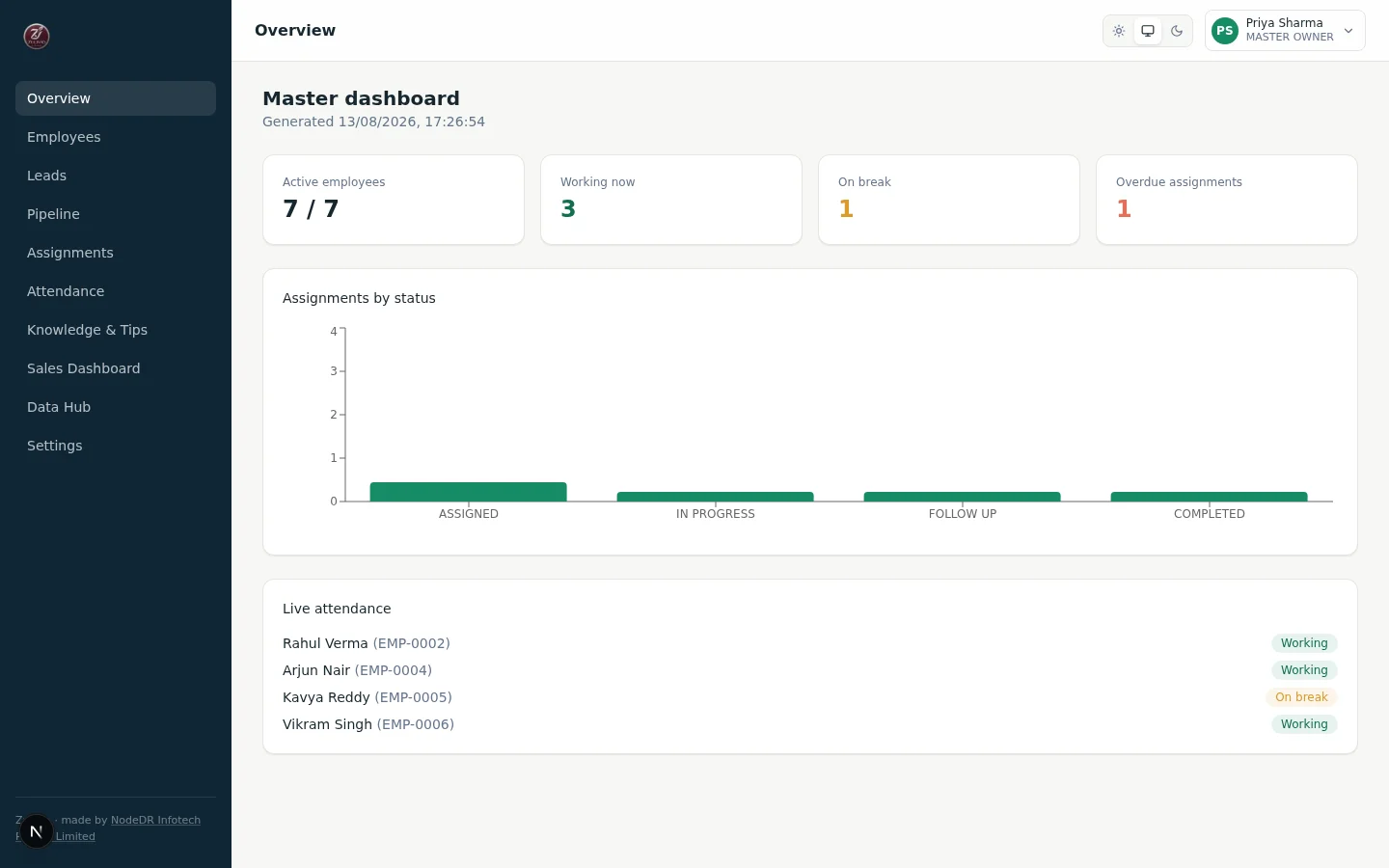
Live dashboard — headcount, assignments, and who's on the clock, at a glance
- AGPL-3.0 LicenseFree to use, modify, self-host
- Self-hostedYour data stays on your server
- Role-guardedNo hidden-button-only permissions
- 41/41 e2e testsRBAC, state machines, backups verified
- CasaOS readyOne-click app install
- Open sourceFork it, extend it, own it
Everything your team's daily operations need
Built for role-based teams and rank-guarded actions — not a generic spreadsheet with a login screen.
Telecalling CRM
A phone-first lead workspace: call, log a single-tap disposition, qualify, move the stage, and schedule the follow-up without leaving the screen. Drag and drop leads across a configurable pipeline — New, Contacted, Connected, Interested, Qualified, Meeting Booked, Proposal Sent, Negotiation, Won — with granular loss reasons on the way out.
Follow-ups that don't slip
Real due-dated follow-ups, grouped into overdue, due now, today, tomorrow and upcoming — completed or rescheduled inline from the queue. A 'Call next lead' button picks the single highest-priority lead for you: overdue follow-up first, then a callback due soon, then a hot lead.
Lead scoring you control
Every lead gets a transparent 0–100 score from budget, decision-maker access, urgency, requirement clarity, timeline and business fit — banded HOT, WARM, or COLD. The weights and thresholds live in your database and are editable in the app, so tuning them never needs a redeploy.
Activity timeline
Every call with its duration and disposition, every note, stage change, reassignment and follow-up, in order, on the lead. Append-only — it records what actually happened rather than what someone remembers.
Lead assignment & routing
Three routing modes per rule — round robin, territory, or capacity — each with a response SLA and an overdue queue. Assign or reassign one lead or hundreds at once, with every reassignment written to the audit log.
Manager & admin dashboards
Per-telecaller calls, connect rate, leads qualified, meetings booked, follow-ups completed, deals won and revenue — plus an org-wide conversion funnel, leads by stage and source, pipeline value, and follow-up health.
Deals & forecasting
Convert a qualified lead into an opportunity without losing its history, then track it on a Kanban deal board with an auditable stage trail, manager-only forecast-category overrides, and a weighted forecast by rep.
Employee lifecycle
Add, edit, and remove employees with auto-generated credentials and a unique employee number. Force-reset a password, change a role or department, or reactivate someone from suspension — all rank-guarded, so no one can promote themselves or a peer.
Role-based access control
Master Owner, Company Admin, Sales Head, Manager, and Employee form a strict hierarchy enforced server-side on every request — not just a hidden button in the UI.
Work assignments
Create work and assign it to a selected employee by number. A guarded status pipeline — Assigned, In Progress, Follow-up, Blocked, Completed, Canceled — rejects invalid jumps and keeps a full transition audit trail with outcome notes.
Attendance tracking
An explicit shift and break state machine — logged out, working, on break — with server timestamps, one open session per employee, and a dangling break auto-closed on shift end. No guessing who's actually on the clock.
Knowledge base & tips
Upload PDF training documents with a draft/publish lifecycle and per-version acknowledgement tracking, plus a daily 'today's tip' feed on every employee's front page.
Master dashboard
Live headcount, assignments by status, overdue count, and a real-time 'who's working / on break right now' board — one screen for the whole organization's operational health.
Employee reports
Login/logout times, total worked and break minutes, per-session breakdown, and assignment counts by outcome — the same evidence for the employee and their manager, not a one-sided surveillance log.
CSV & Google Sheets
Export employees and assignments to CSV with formula-injection protection built in. Import employees from CSV with row-level error reporting, and a real Google Sheets adapter that only activates once you provide credentials — never a fake integration.
Self-hosted, your data
Runs entirely on your own server via Docker. No subscription, no per-seat fee, and nothing about your team or customers leaves your infrastructure.
Backups & one-click updates
Connect any S3-compatible bucket and Zulivio backs itself up on a schedule — download or restore a copy any time — plus a one-click update button in Settings that pulls the latest release and restarts the app for you.
MCP server for AI assistants
Point Claude, ChatGPT, or any MCP-compatible client at Zulivio's own MCP server with a personal API key, and it can list your leads, create one, check the sales dashboard, log your attendance, or update a task — scoped to exactly your own role's permissions, nothing more.
See it in action
Real screenshots from a running Zulivio instance — the telecaller’s day, the lead board and workspace, follow-ups, reporting, and the workforce core underneath.
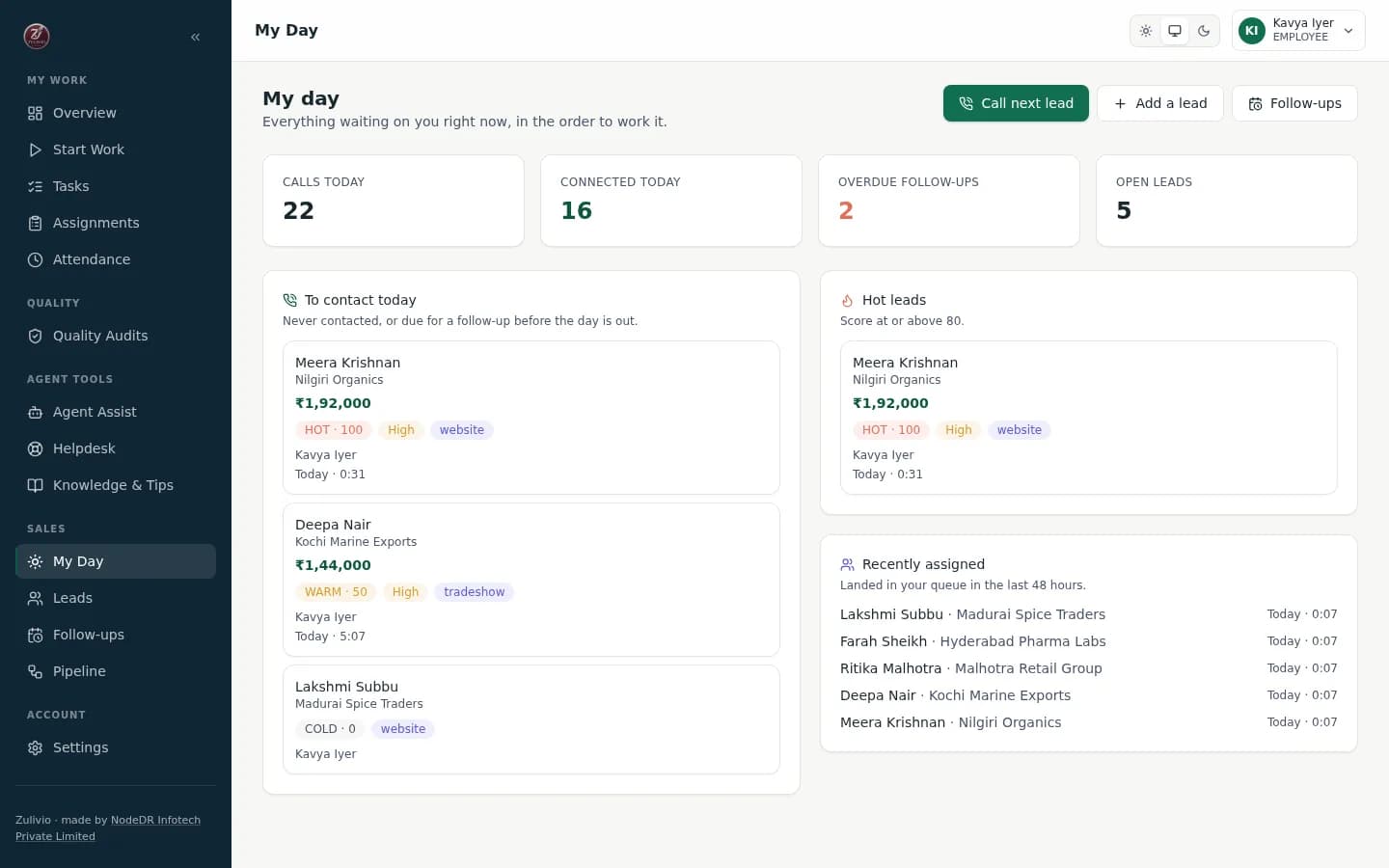
My Day — Telecaller's Dashboard
My Day — the telecaller's queue: who to call, what's due, and what's running hot
- Prioritized lead queue with overdue alerts
- Due-today tasks and follow-ups
- One-tap call, WhatsApp, email initiation
- Real-time task completion status
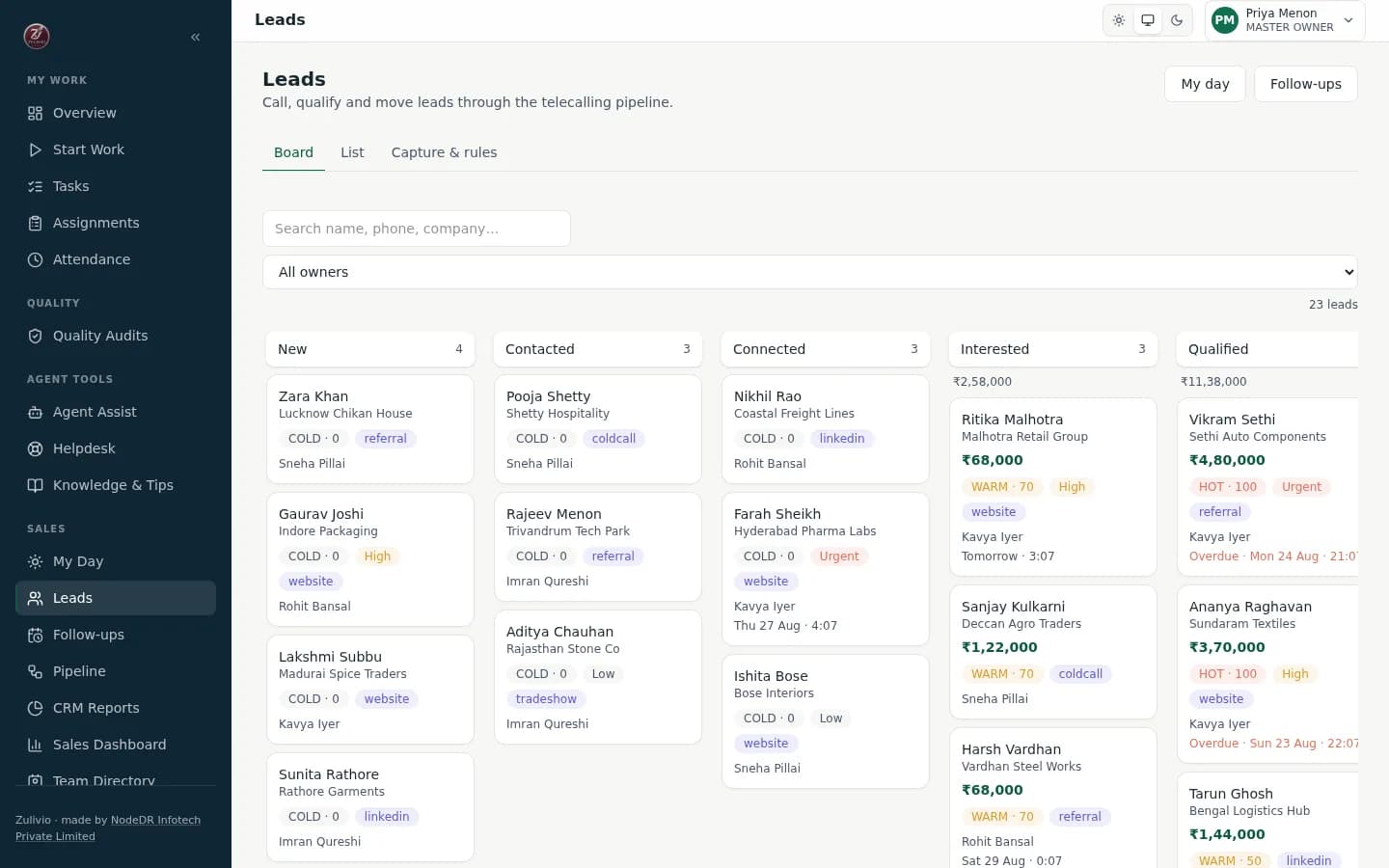
Lead Board — Drag & Drop Pipeline
Lead board — drag a lead across the telecalling pipeline, or move it from its detail page
- 10-stage configurable pipeline
- Move leads between stages instantly
- New → Contacted → Connected → Won
- Filter by owner, score, priority
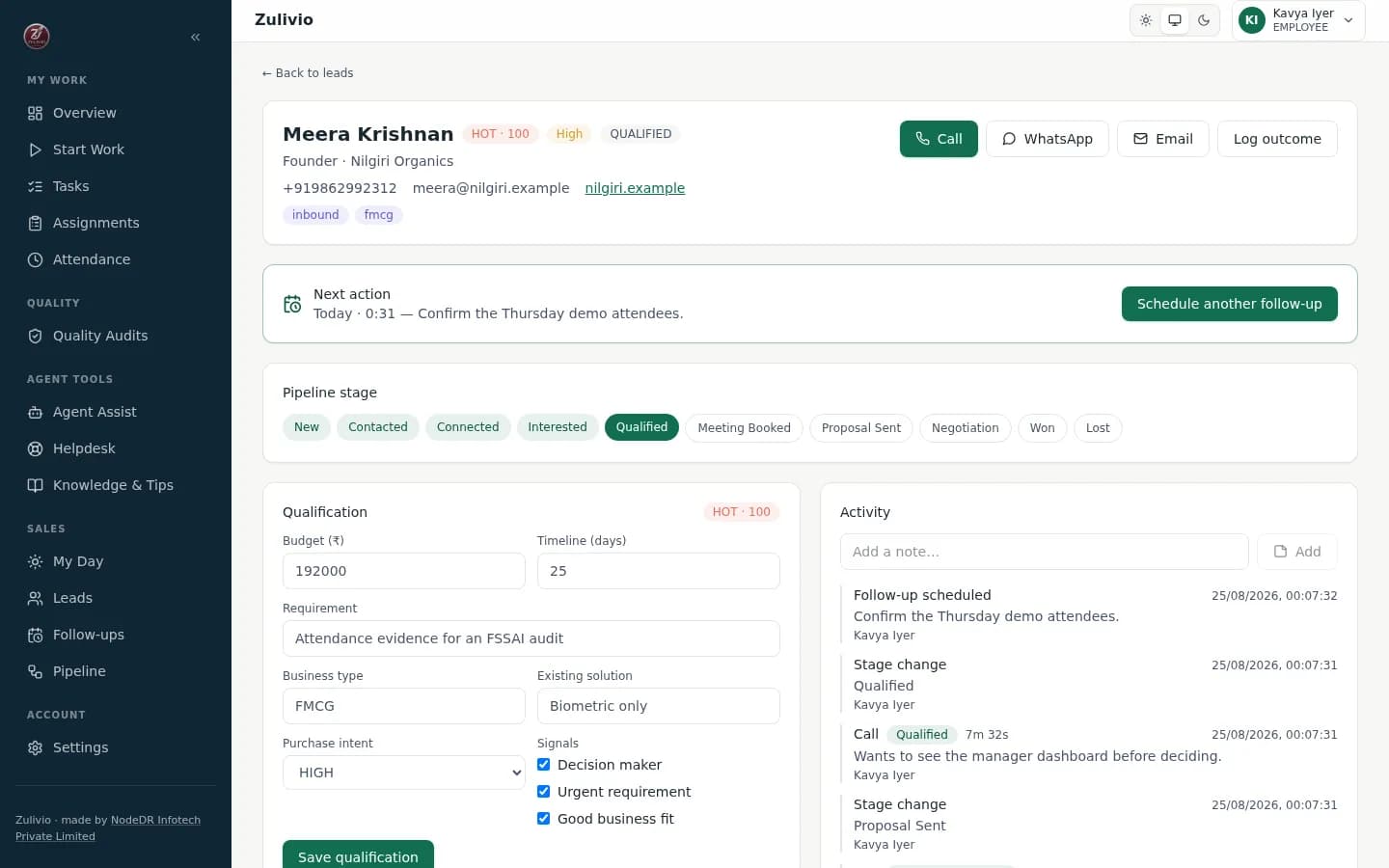
Lead Workspace — Single Screen CRM
Lead workspace — call, qualify, log the outcome, and book the follow-up on one screen
- Call/WhatsApp/Email from one screen
- Visual pipeline progress indicator
- Full history of interactions
- Calendar-integrated follow-up scheduling
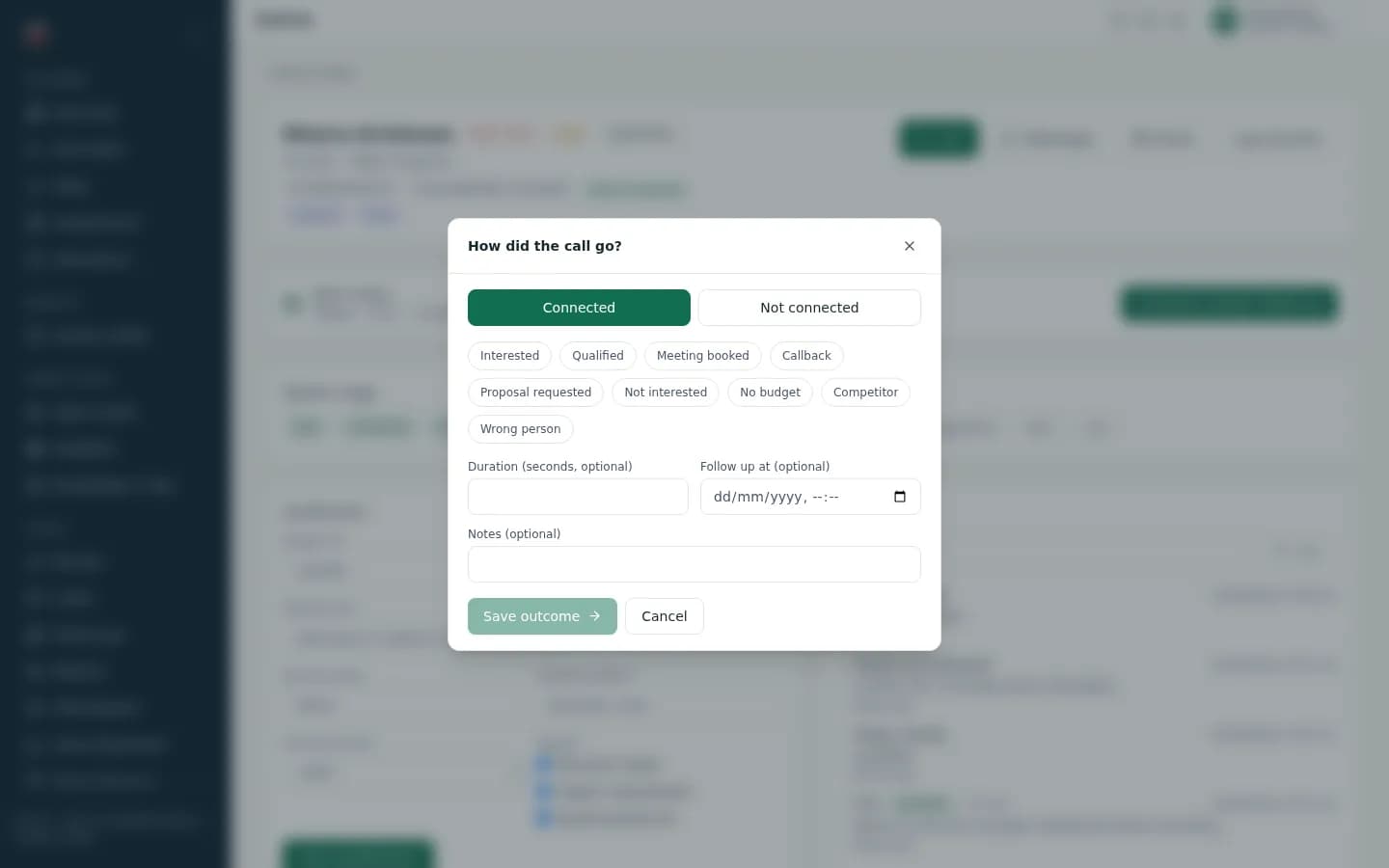
Call Disposition — Quick Outcome Logging
Call disposition — one tap for the outcome, one for the reason, then back to the queue
- Connected/Not Connected tracking
- Predefined disposition codes
- Automatic call duration capture
- Quick text notes for call details
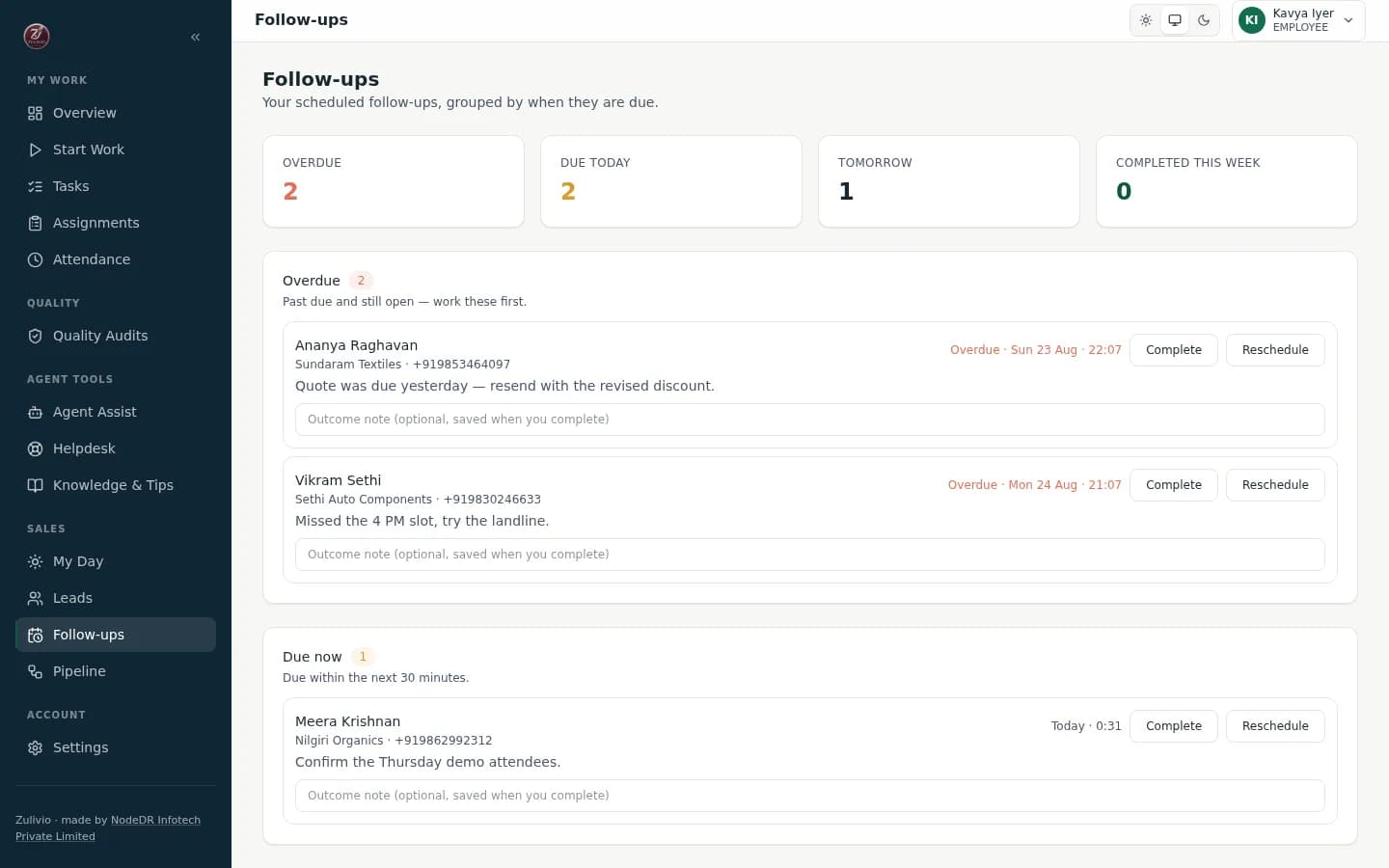
Follow-ups — Smart Task Buckets
Follow-ups — grouped by when they're due, completed or rescheduled without leaving the list
- Auto-categorized by urgency
- Complete or reschedule in one click
- Color-coded priority levels
- Support for repeated follow-ups
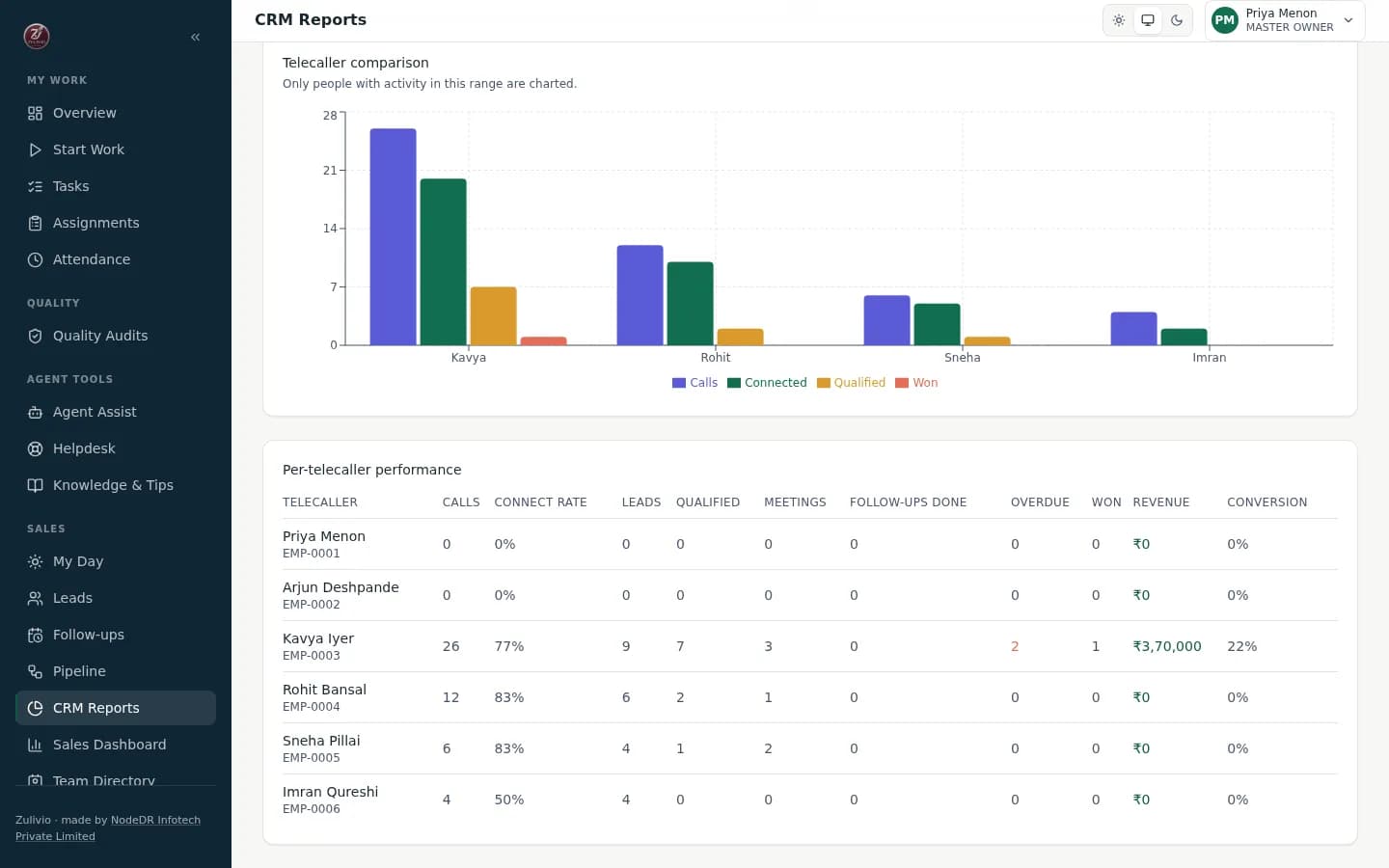
Telecaller Performance — Team KPIs
Telecaller performance — calls, connect rate, meetings, follow-ups, and revenue per rep
- Calls, duration, connect rate
- Booked vs completed meetings
- Per-rep sales contribution
- Side-by-side team comparison
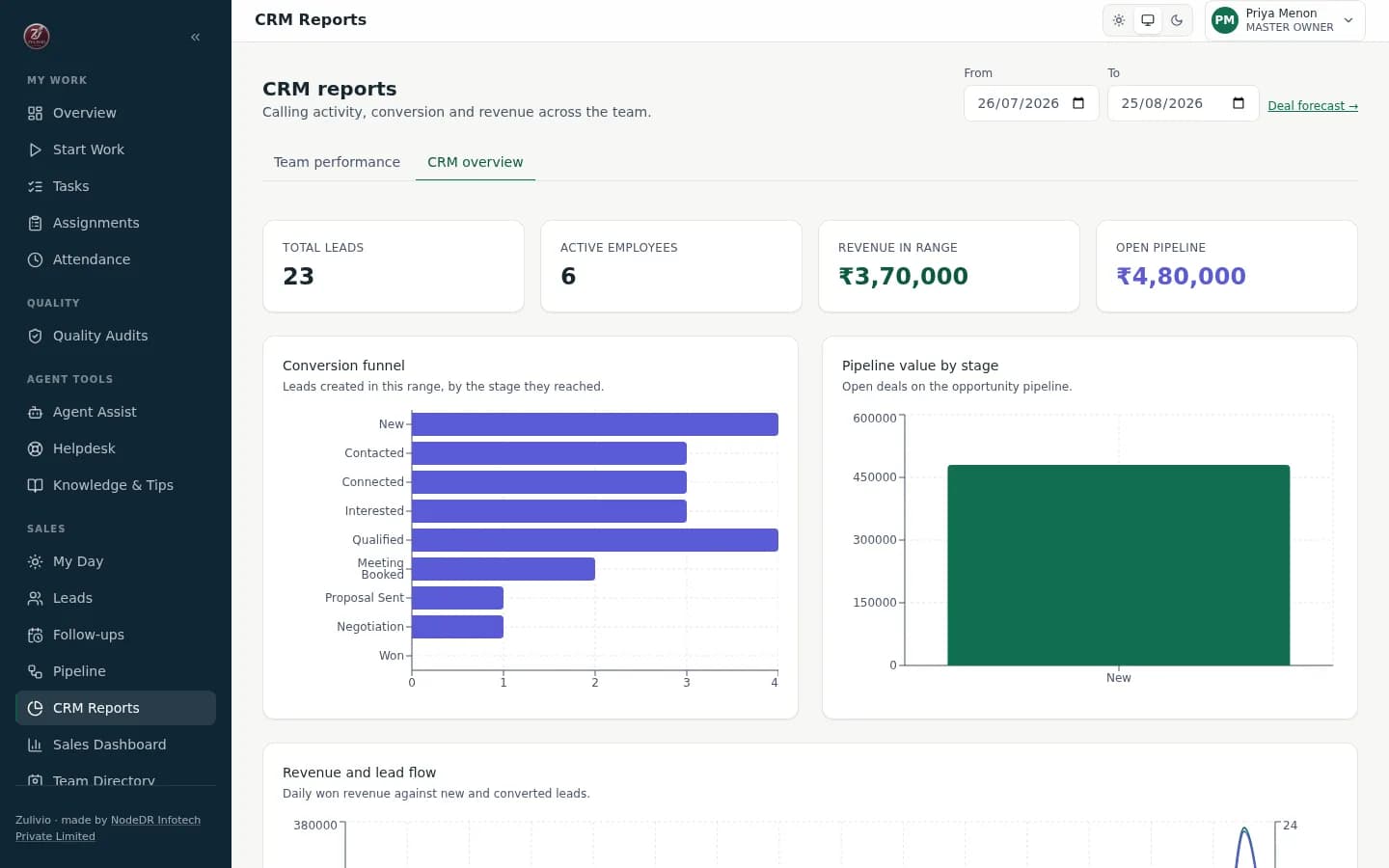
CRM Overview — Organization Dashboard
CRM overview — org-wide funnel, pipeline value, revenue trend, and follow-up health
- Company-wide sales metrics
- Lead distribution across stages
- 14-day won/lost/new-leads chart
- Weighted pipeline projections
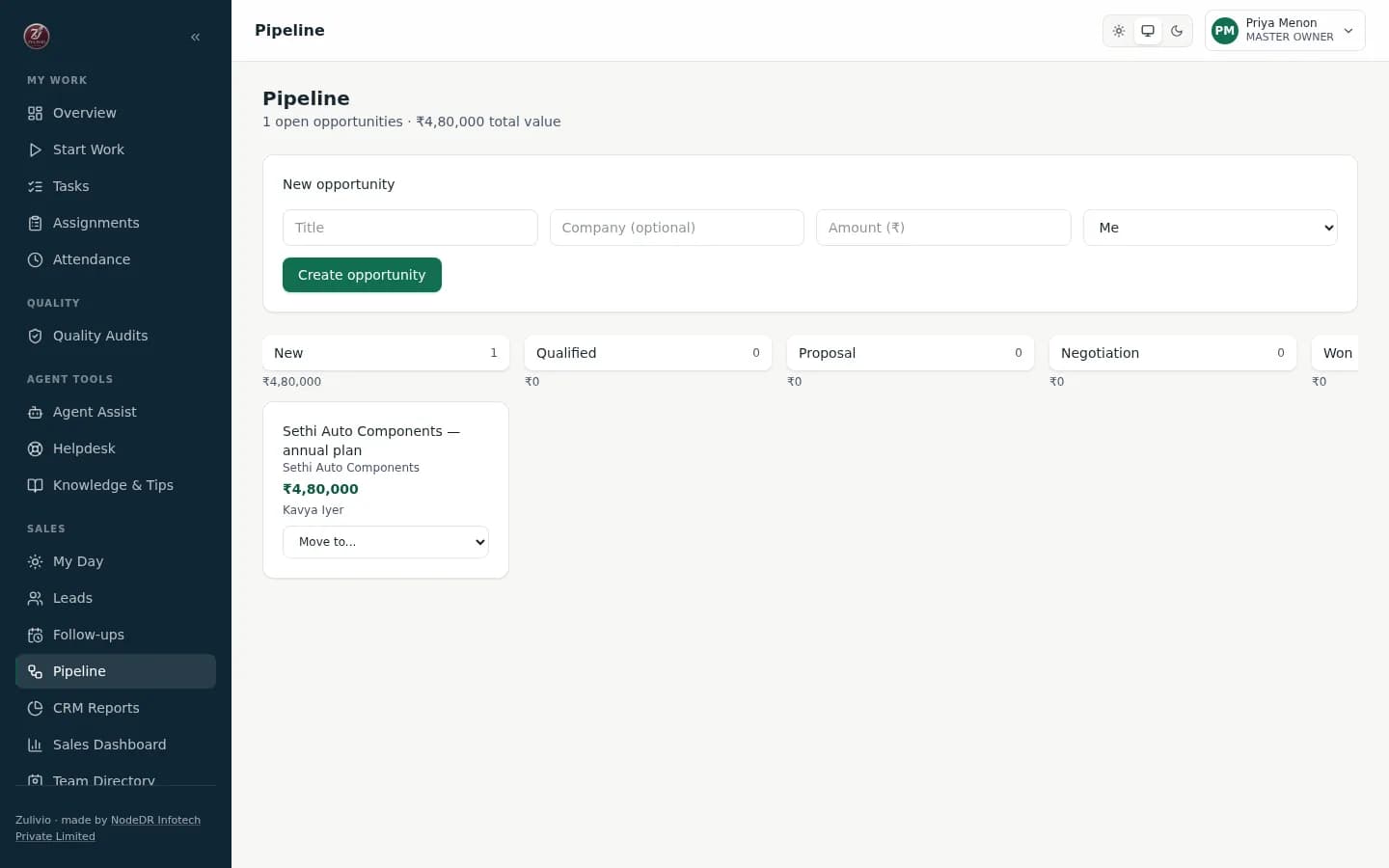
Deal Pipeline — Opportunity Management
Deal pipeline — qualified leads become opportunities without losing their history
- 6-stage pipeline: New → Won/Lost
- Visual stage transitions
- Full stage-change audit trail
- Manager forecast overrides
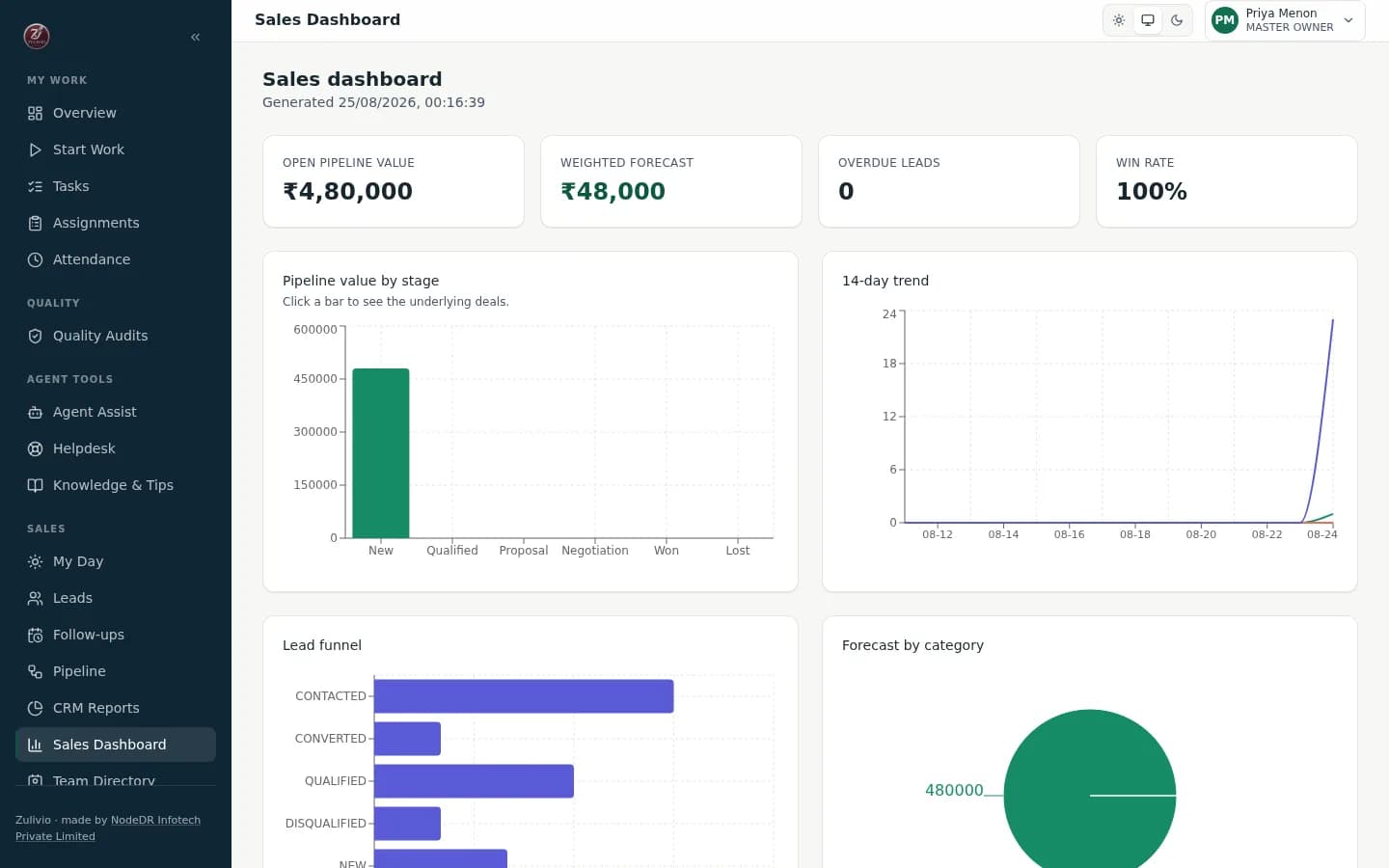
Sales Dashboard — Revenue Analytics
Sales dashboard — pipeline value, lead funnel, and weighted forecast by rep
- Total and weighted forecast
- Source-to-conversion analysis
- Individual sales attribution
- Deal outcome visualization
Master Dashboard — Live Operations
Master dashboard — headcount, assignments by status, and who's on the clock right now
- Real-time headcount and status
- Tasks by status breakdown
- Who's working/on break right now
- KB usage and training progress
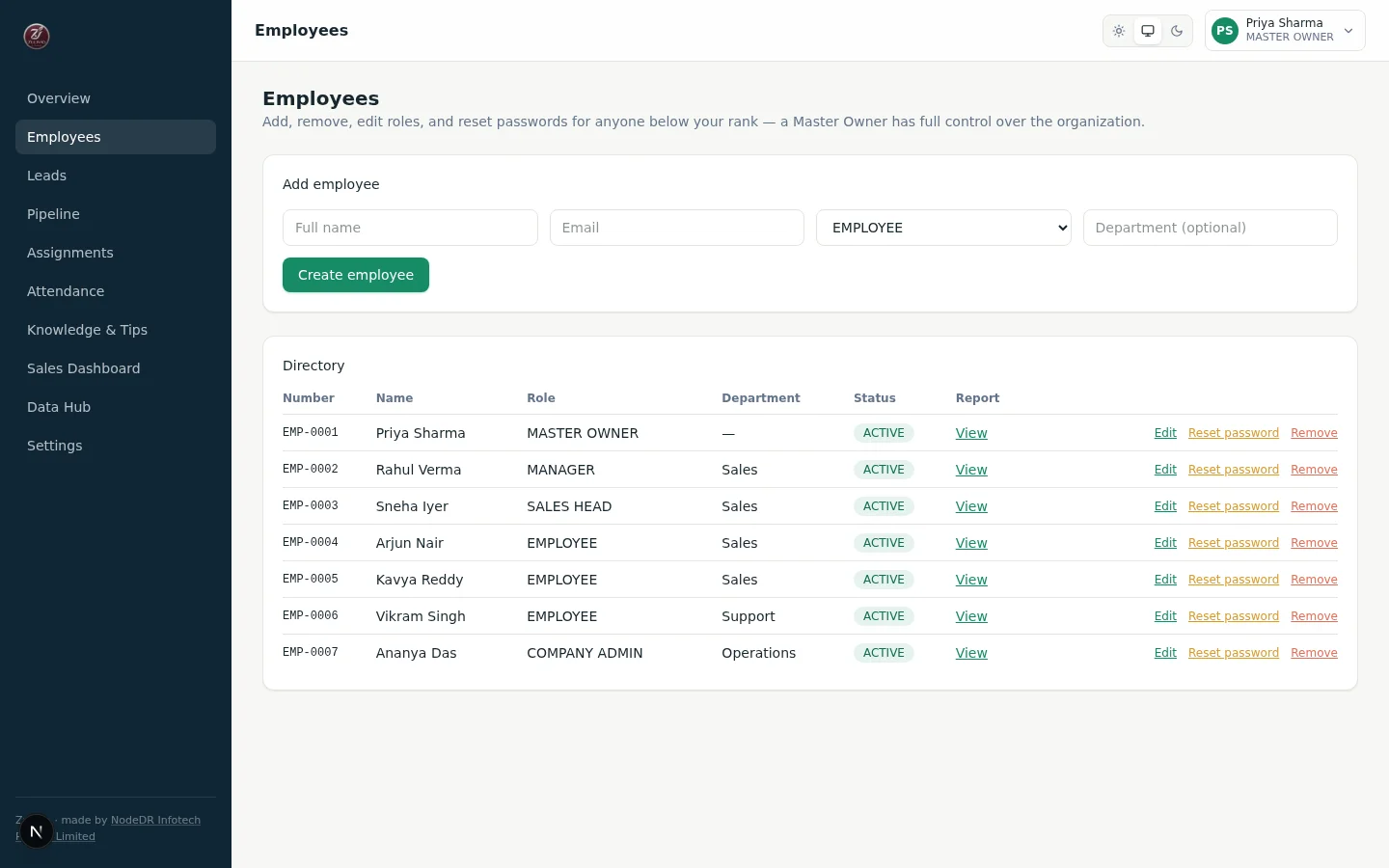
Employee Directory — Role Management
Employee directory — add, edit, reset password, and remove, all rank-guarded
- 5-level permission hierarchy
- Auto-generated EMP-0001 IDs
- Temporary passwords (shown once)
- Revoke all sessions on removal
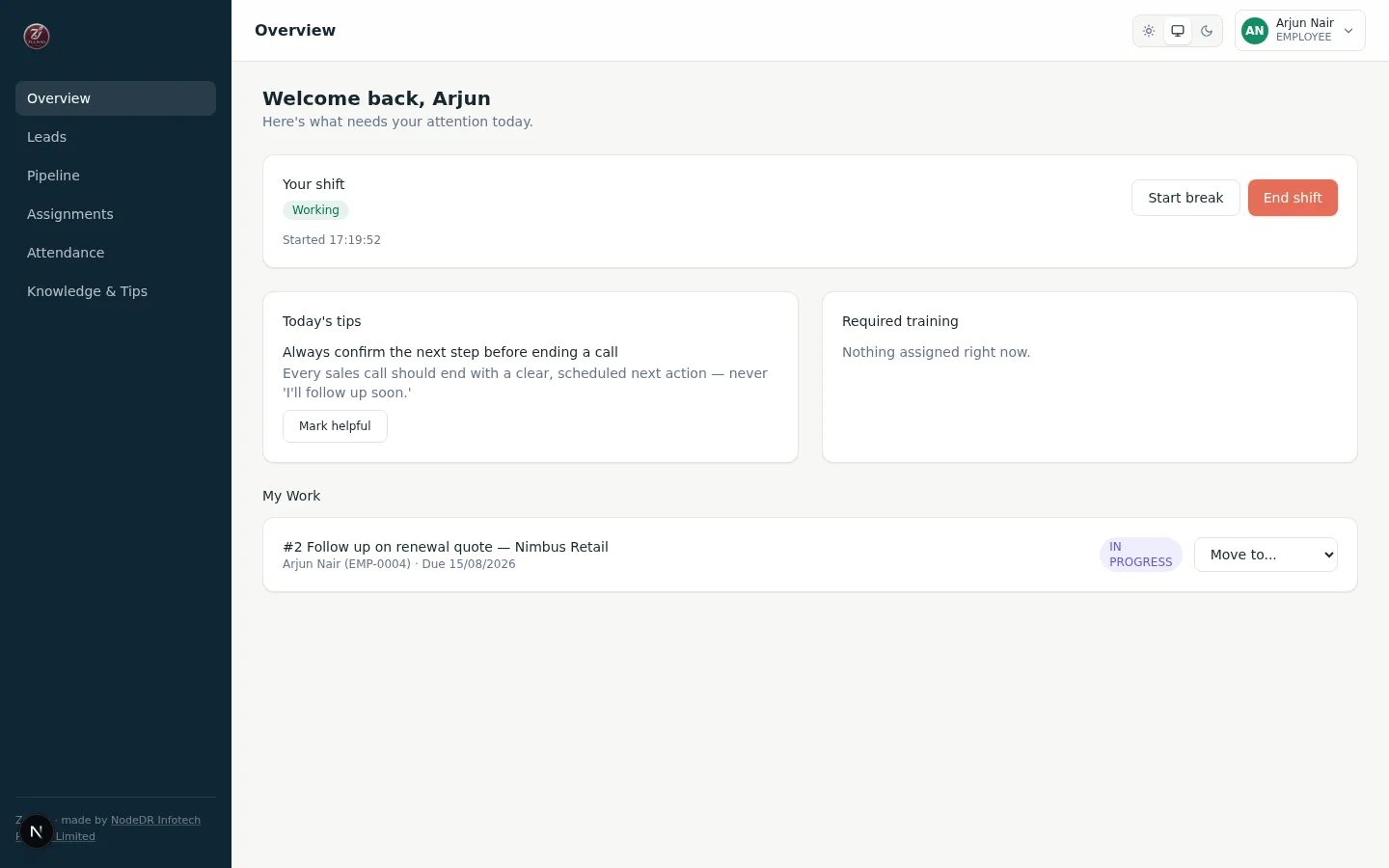
Employee Front Page — My Work
Employee front page — shift controls, today's tips, and a personal work queue
- Prioritized work queue
- Start/pause/end attendance
- Daily knowledge base feed
- Work/break status indicator
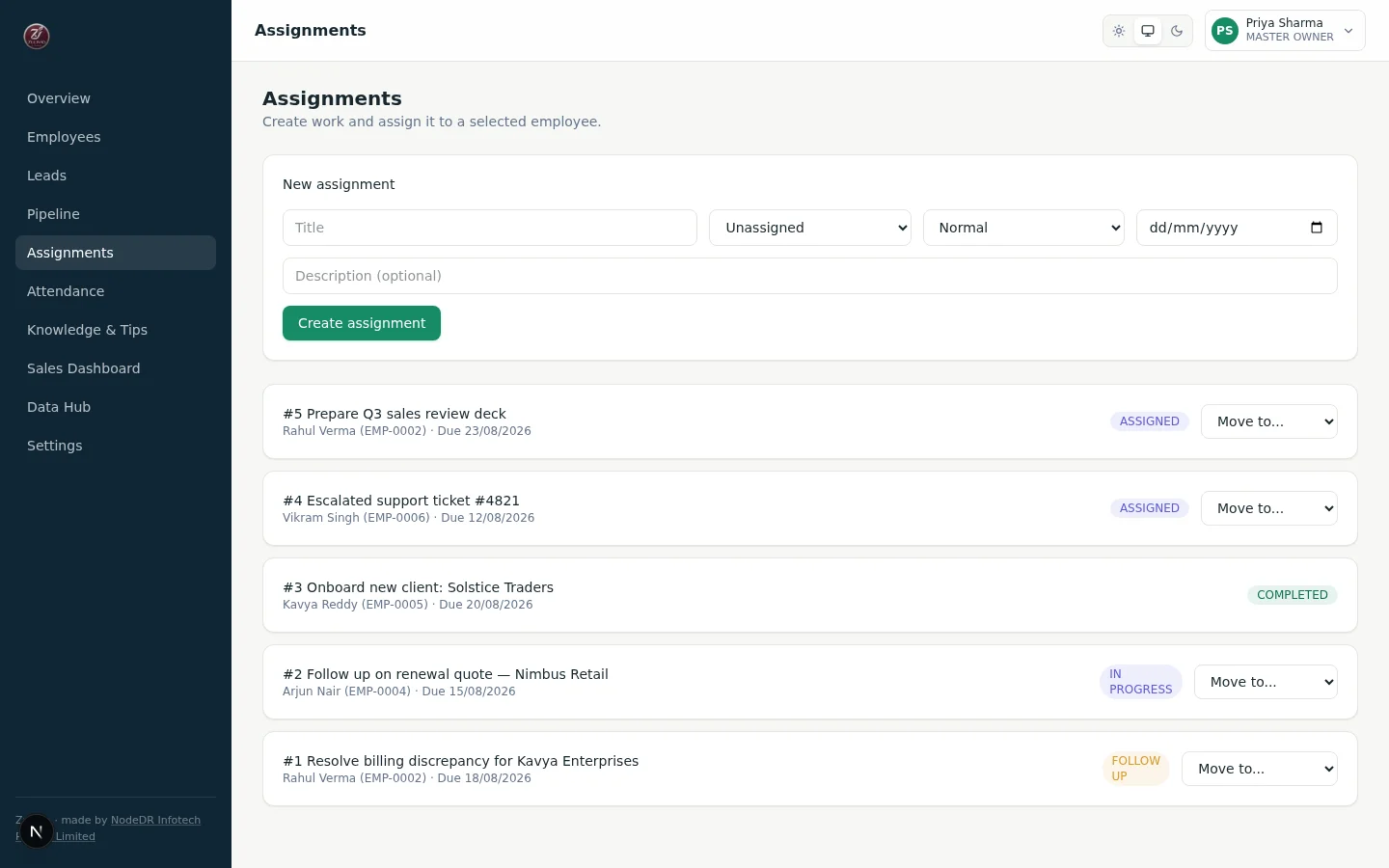
Assignments — Status Pipeline
Assignments — create work, assign it by employee, move it through a guarded pipeline
- ASSIGNED → IN_PROGRESS → COMPLETED
- Invalid moves rejected server-side
- Document completion details
- Full transition history logged
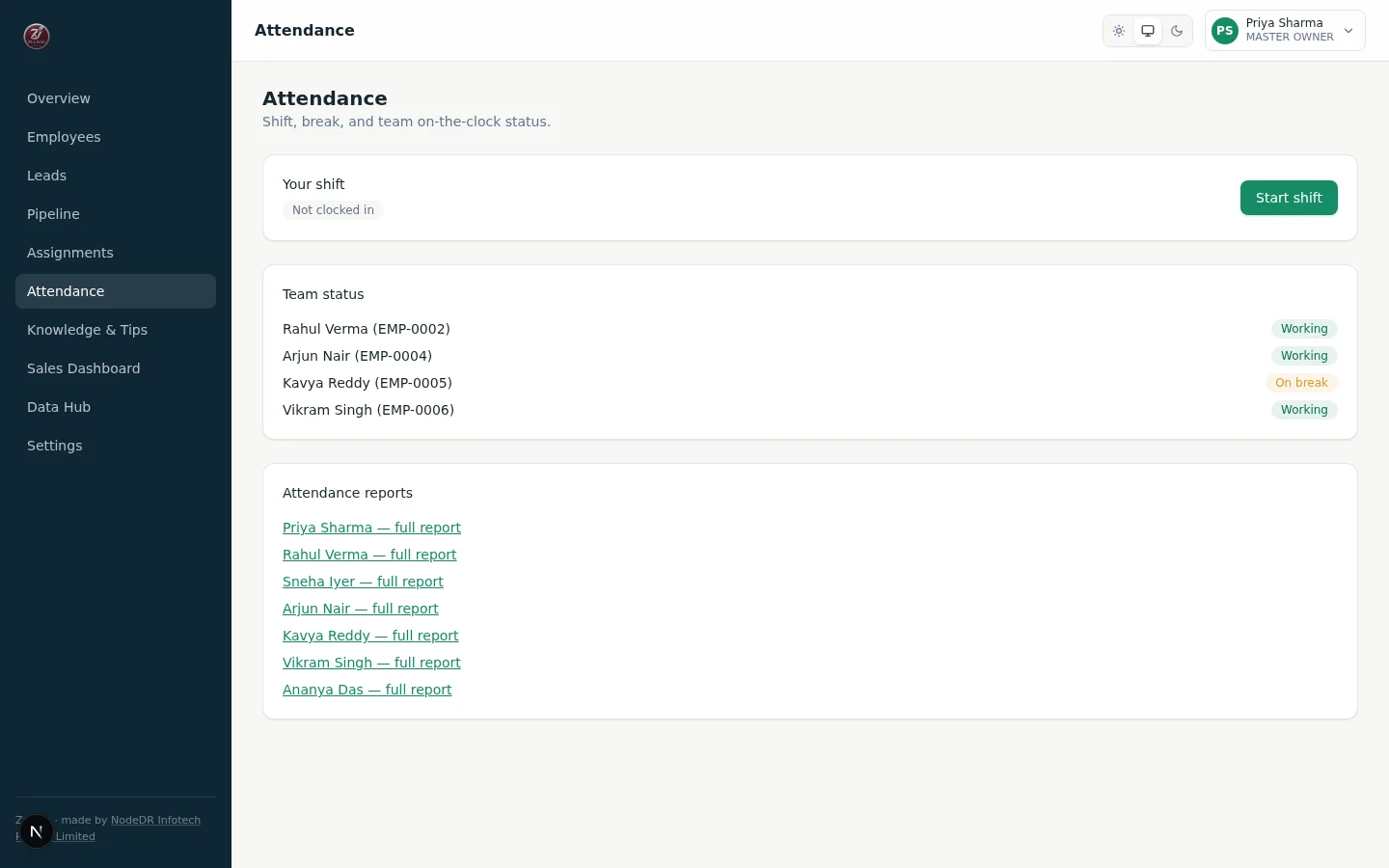
Attendance — Shift State Machine
Attendance — your shift, team status, and a link to every employee's full report
- logged_out → working → on_break
- Clock-in/out server timestamps
- One open session enforced
- Dangling breaks auto-resolved
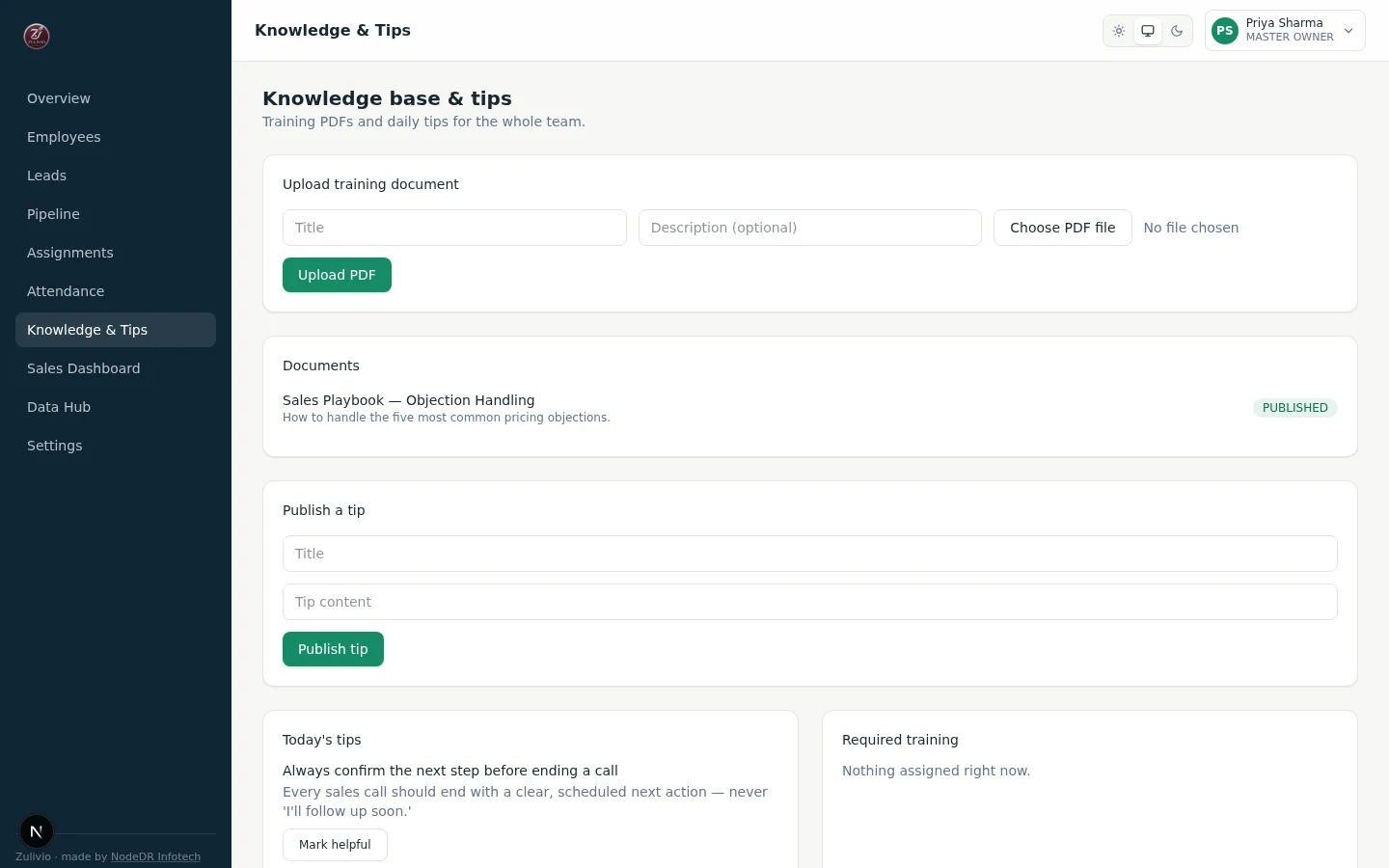
Knowledge Base — Training Hub
Knowledge base & tips — PDF training documents and a daily team tip
- Upload, draft/publish lifecycle
- Role/person-targeted docs
- Per-version read tracking
- Daily tips on employee page
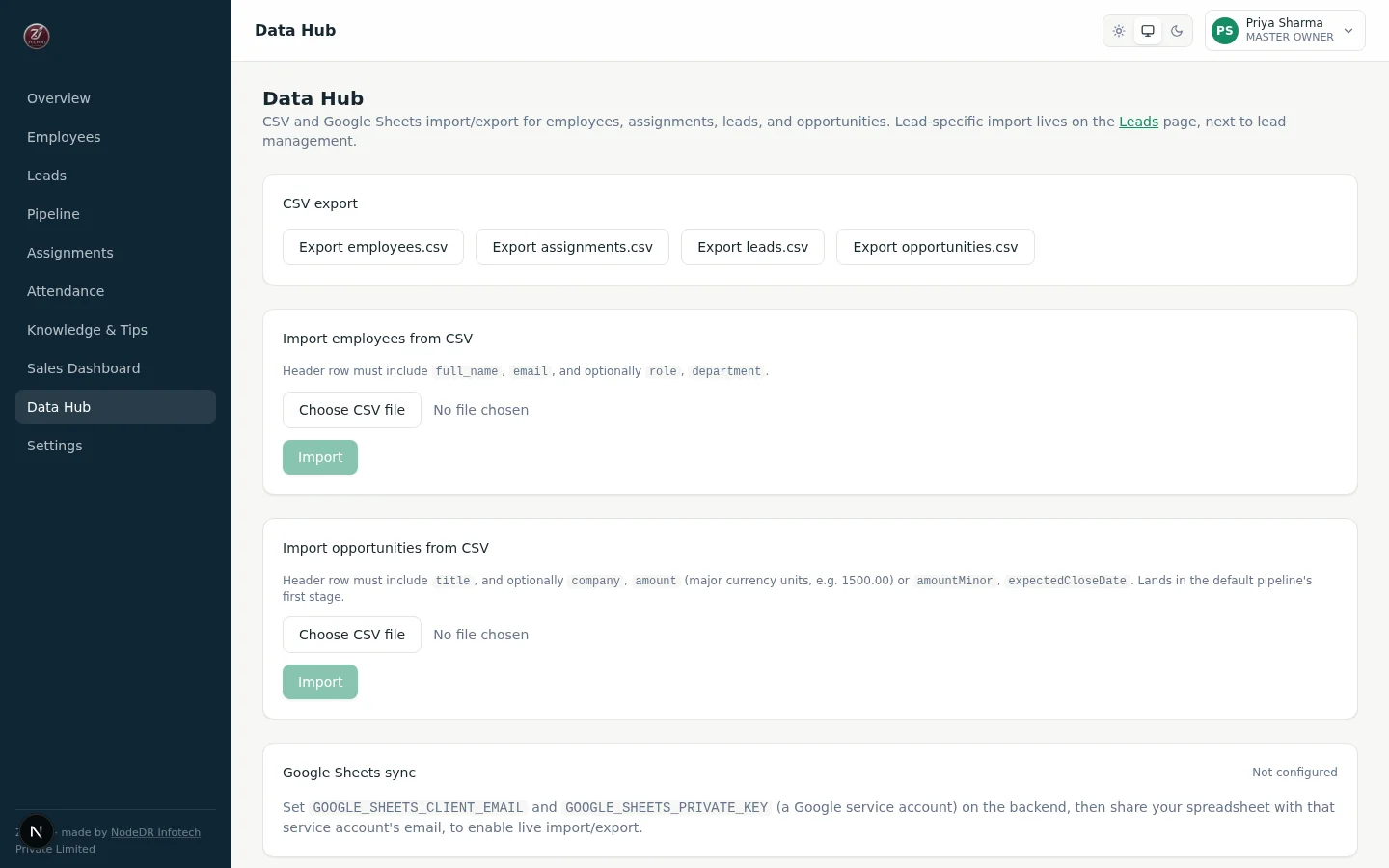
Data Hub — CSV import/export and a real, credential-gated Google Sheets sync
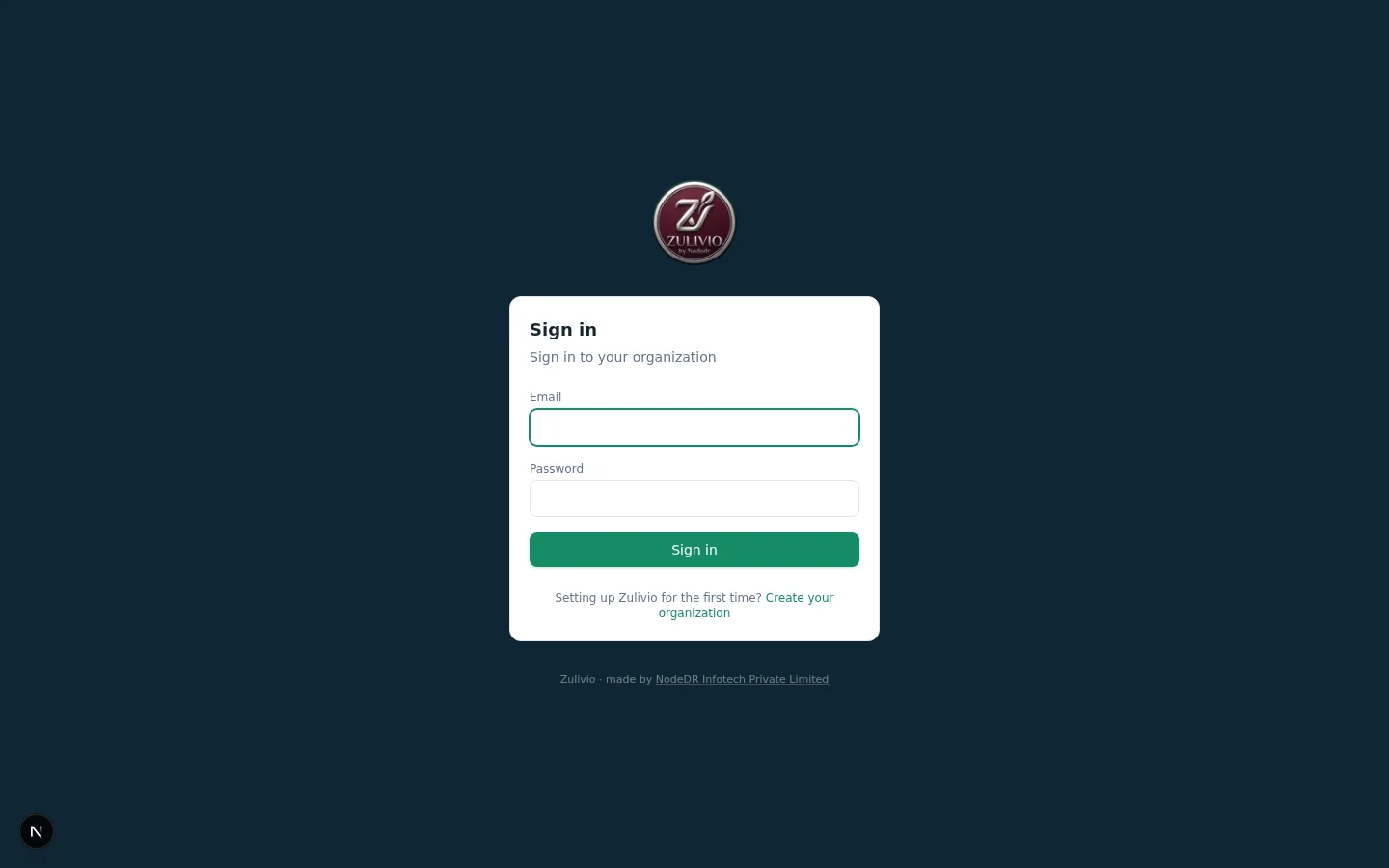
Sign in — session-based auth with Argon2id password hashing
One setup, wherever your team is
“Self-hosted” describes who controls the data, not where the machine has to live. Same software, same data, same login — no separate “cloud” mode to configure.
Default, recommended
A local server
One machine on your network runs the software. Every device — desktop, laptop, tablet — reaches it over the LAN. Nothing about your team's data leaves the building unless you explicitly connect an integration like Google Sheets.
For remote teams
Any VPS or cloud server
The identical setup also runs unmodified on a rented cloud server (DigitalOcean, Hetzner, AWS, etc.) if your team is distributed rather than in one office. Nothing else about the software changes.
Reachable from outside the LAN
Behind a tunnel
Point a tunnel (Cloudflare Tunnel, ngrok, Tailscale Funnel, or any reverse proxy) at it for a real HTTPS address with no port-forwarding. Once traffic reaches it over https://, turn on Secure cookies — plain http:// LAN setups leave this off by default.
One-click app install
CasaOS / ZimaOS
Pre-built images, no build step — install straight from an app manifest URL on a CasaOS or ZimaOS home server. Official app store submission is pending; it installs today via CasaOS's own custom-install flow.
Desktop app, no Docker
Windows (Microsoft Store)
Self-contained MSIX package with an embedded database — install directly from the Microsoft Store. No Docker, no server setup required. Perfect for individual users or small teams who want a native Windows experience.
Any device on your organization’s network
The server runs on Linux, macOS, or Windows. Every desktop, laptop, or tablet on the same network opens it straight in a browser — no per-device app to install.
How it works
One port exposed. The web app proxies API calls to the backend over the internal Docker network — the backend and database are never reachable from your LAN directly.
  Browser
        │  http://<server>:3100   (the ONLY exposed port)
        ▼
┌──────────────────────────┐  /api/* proxied server-side  ┌──────────────────────┐
│   web  :3100               │ ──────────────────────────▶  │  backend (internal)  │
│   Next.js / React         │ ◀──────────────────────────  │  NestJS + Prisma     │
└──────────────────────────┘   (internal Docker network)   └──────────┬───────────┘
                                                                       │
                                                                       ▼
                                                          PostgreSQL (Docker volume)
                                                          Your data never leaves
One port, one origin
Port 3100 is the only exposed port. The API is reachable only through the web app's /api proxy, so the session cookie stays first-party and the backend is never published directly to your network.
Server-side role checks
Every request is authorized against a strict role hierarchy in the backend — Master Owner, Company Admin, Sales Head, Manager, Employee — never just a hidden button in the UI.
Data in a Docker volume
PostgreSQL persists in a named Docker volume, migrated automatically on startup. Containers restart, rebuild, and update; your employees, assignments, and attendance history stay untouched.
Run Zulivio from Claude or any AI assistant
Zulivio ships its own MCP server. Generate a personal API key and point an MCP client at it — every call is checked against your own role’s exact permissions, so it can never do more than you could do yourself in the app.
What you can ask it to do
- List your leads
- Create a lead
- Check the sales dashboard
- List your tasks
- Update a task's status
- Start or end your attendance
How Zulivio stacks up
Versus a hosted per-seat CRM and the spreadsheet-and-WhatsApp approach.
Cost
Data stays on your server
Lead pipeline with drag-and-drop stages
Call disposition tracking
Due-dated follow-up queue
Configurable lead scoring
Per-telecaller performance reporting
Role-based access control
Guarded assignment status pipeline
Attendance shift/break tracking
Employee self-service reports
Knowledge base with version tracking
CSV import/export
No vendor lock-in
Open source
Up and running in a few minutes
No manual setup, no config files to edit. If you're not comfortable with a terminal, any IT helper can run the one command below for you.
Run one command
This copies the software onto your server and sets it up automatically — it checks for the one free tool it needs (Docker), generates a secure database password, then builds and starts everything for you.
git clone https://github.com/Raktim94/zulivio.git && cd zulivio && ./install.sh
Open it in a browser
Once setup finishes, open the address it prints and go to /setup. A short wizard walks you through creating your organization and its first Master Owner account.
# Open in a browser:
http://localhost:3100/setup
Add your team
Go to Employees and add your first manager or team member — Zulivio generates a unique employee number and a temporary password for them automatically.
# From any device on your network:
http://<your-server's-address>:3100
What’s built, and what’s next
Zulivio is under active, transparent development. This is the real phased plan from the repo’s own ROADMAP.md — not marketing promises.
Foundation & workforce core
Shipped- Org, roles & permissionsShippedMaster Owner, Company Admin, Sales Head, Manager, Employee — a strict hierarchy enforced server-side on every request.
- Employee lifecycleShippedAdd, edit, reset password, and remove — full CRUD, all rank-guarded, generated credentials shown exactly once.
- Work assignmentsShippedA guarded status pipeline (Assigned → In Progress → Follow-up/Blocked → Completed/Canceled) with a full transition audit trail.
- Attendance trackingShippedAn explicit shift/break state machine with server timestamps — one open session per employee, no ambiguity about who's on the clock.
- Knowledge base & tipsShippedPDF training documents with a draft/publish lifecycle and per-version acknowledgement tracking, plus a daily team tip.
- Master dashboard & CSV/SheetsShippedLive headcount and assignment status, CSV import/export, and a real (credential-gated) Google Sheets adapter.
- Docker Compose & one-click installShippedinstall.sh generates a secure database password and starts the whole stack. CasaOS/ZimaOS app listing included.
Sales CRM — first cut shipped
In Progress- Lead qualification pipelineShippedLeads move New → Contacted → Qualified → Disqualified through a configurable pipeline.
- Round-robin assignment & SLAShippedRound-robin assignment rules with a per-rule response SLA timer and an overdue queue.
- Lead-to-opportunity conversionShippedConverts a qualified lead into an opportunity while preserving its full history.
- Kanban pipeline boardShippedDefault 6-stage pipeline (New/Qualified/Proposal/Negotiation/Won/Lost) with an auditable stage-transition trail.
- Forecast overridesShippedManager-only forecast-category overrides with a full adjustment audit trail.
- Sales dashboardShippedPipeline value by stage, lead funnel, forecast-by-category, and weighted forecast by rep.
- Territory & capacity assignment routingShippedRound robin, territory (a lead's region maps to a specific rep), and capacity (routes to whoever holds the fewest open leads) — three routing modes per rule.
- Opportunities CSV import/exportShippedThe same header-mapped CSV pattern already used for leads, now for opportunities too.
- Automated S3 backupsShippedConnect any S3-compatible bucket from Settings — tested live before saving. Verified rolling retention (a backup always exists, never a zero-backup window) and a one-click, confirmation-gated restore.
- Activity / audit logShippedWho did what, when — employee changes, password resets, exports — viewable in-app (Settings, Master Owner only), not just written to the database.
- Rank-scoped employee directoryShippedAn account is only ever visible to someone who could also manage it — the same strictly-below-your-rank rule now applies to viewing, not just editing.
- Multiple pipelines per orgConfigurable pipelines by department, product, or region, instead of one default pipeline.
- Contacts & accounts layerA dedicated contact/account object — leads and opportunities currently stand alone.
Telecalling CRM — shipped
Shipped- Telecalling lead boardShippedDrag and drop across a configurable ten-stage pipeline — New, Contacted, Connected, Interested, Qualified, Meeting Booked, Proposal Sent, Negotiation, Won, and Lost with a specific reason.
- Lead workspaceShippedContact header with Call/WhatsApp/Email, stage strip, qualification fields, activity timeline and the next action — one screen, no navigating away to log a call.
- Call dispositionsShippedSingle-tap outcome and disposition with duration and notes. The pair is validated server-side, so a not-connected call can't be filed as 'meeting booked' and skew connect-rate reporting.
- Activity timelineShippedEvery call, note, stage change, reassignment and follow-up on the lead, in order. Append-only.
- Due-dated follow-upsShippedGrouped into overdue, due now, today, tomorrow and upcoming — completed or rescheduled inline from the queue.
- Configurable lead scoringShippedA transparent 0–100 rubric banded HOT/WARM/COLD. Weights and thresholds live in the database and are editable in the app.
- Call Next LeadShippedPicks the single highest-priority lead: overdue follow-up, then callback due soon, then hot lead, then new, then longest untouched.
- Search, filters & bulk actionsShippedServer-side search and filtering across stage, owner, source, score, priority and date ranges; multi-select assign, stage change and tagging.
- Manager & admin dashboardsShippedPer-telecaller calls, connect rate, meetings, follow-ups and revenue, plus an org-wide funnel, leads by stage and source, and follow-up health.
- Calling provider integrationThe seam for a real dialer is built in; cloud telephony, call recording and predictive dialing are not part of this release.
Automation, service & success
Planned- Automation builderTrigger-condition-action workflows with a draft/test/publish lifecycle and a run log — never a silent black box.
- Customer Service CRMOmnichannel ticket intake, SLA routing, and a shared inbox connected to the same customer timeline.
- Customer SuccessOnboarding plans, transparent health scoring, and a renewal pipeline.
- Marketing CRMCampaign planning, consent management, and lead-to-revenue attribution.
Delivery, field service & platform
Future- Delivery & revenue opsSale-to-delivery handoff, quotes, and contract/renewal tracking.
- Field serviceWork orders, scheduling, and a technician-facing mobile workflow.
- Department BuilderConfigure new department workspaces — custom fields, pipelines, and SLAs — without forking the codebase.
Governed AI
Future- Human-approved draftingCall/meeting summaries and message drafts that always require human confirmation before sending.
- Permission-aware knowledge assistantAnswers cite their source document and respect the asking user's own access scope — never more.
Want to shape the roadmap?
Open a feature request on GitHub or contact us — this is early-stage with a lot of open scope, and community feedback drives what gets built next.
Zulivio is made and maintained by NODEDR INFOTECH PRIVATE LIMITED. It is free, open-source software released under the AGPL-3.0 License — you can use it, modify it, and run it in your organization with no restrictions.
Official website: www.nodedr.com
Common questions
Ready to run your team on Zulivio?
One command. Your own server. Your team’s data stays where it belongs — with you.